Inviting Retailers and Suppliers
Retailers Inviting Suppliers
If the Supplier you wish to connect with already has a Carro Now Powering Modern Dropship account, they will receive an email notifying them that you would like to trade with them.
If they do not already have an account, they will receive an email prompting them to create an account in order to trade with you.
Invite a Supplier
Navigate to Suppliers > Add Suppliers email > Click Send invite

Suppliers Inviting Retailers
If you were invited by a Retailer (Existing Account)
Navigate to your Retailers page. The Retailer who invited you will be listed as one of your preset partners. Click on their entry.
Assign Pricelist
If you were invited by a Retailer (New Account)
You will receive a email from Carro Now Powering Modern Dropship asking you to create an account.
Once the account is created - Complete "Get Started" section
Make sure Pricelist is created and assigned
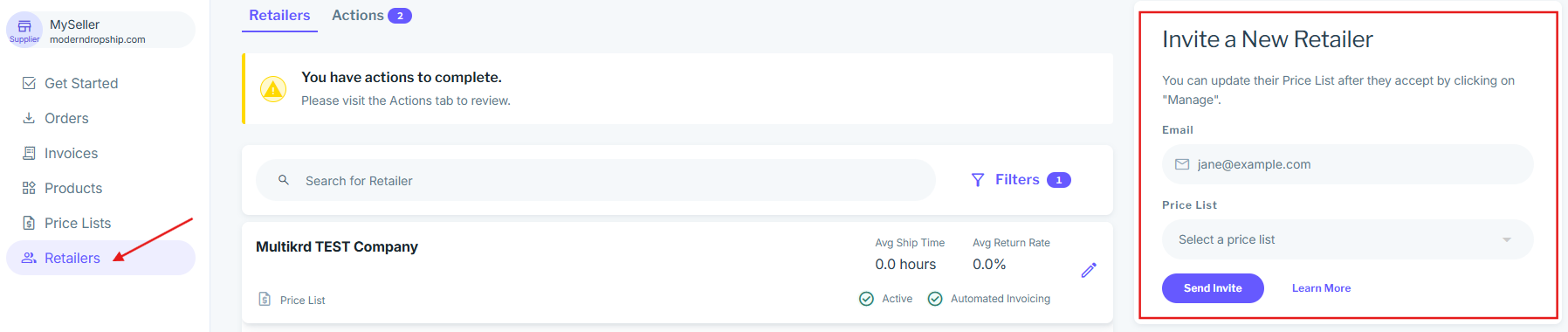
Inviting a Retailer (Uncommon)
Navigate to Retailers > Add Retailer email > Select Pricelist you want to assign to the buyer > Click Send invite